Live polling, right inside PowerPoint.
OMBEA Response adds one new tab to PowerPoint. Add a question slide, run your slideshow and watch every answer come in.


Trusted by universities, airlines and global brands























Add a question to the deck you already have.
Click New question. You get a normal PowerPoint slide with three parts: your question, the answer options and a native chart.
Make it look like the rest of your deck.
It is a real slide. Pick your theme, add pictures and animations, and edit it like any other slide.
- Your theme, fonts and colors
- Pictures, shapes and icons
- PowerPoint animations
- Edit it like any slide
A. Pricing
B. Case studies
C. Roadmap
D. Q&A

Run your slideshow. Everyone answers.
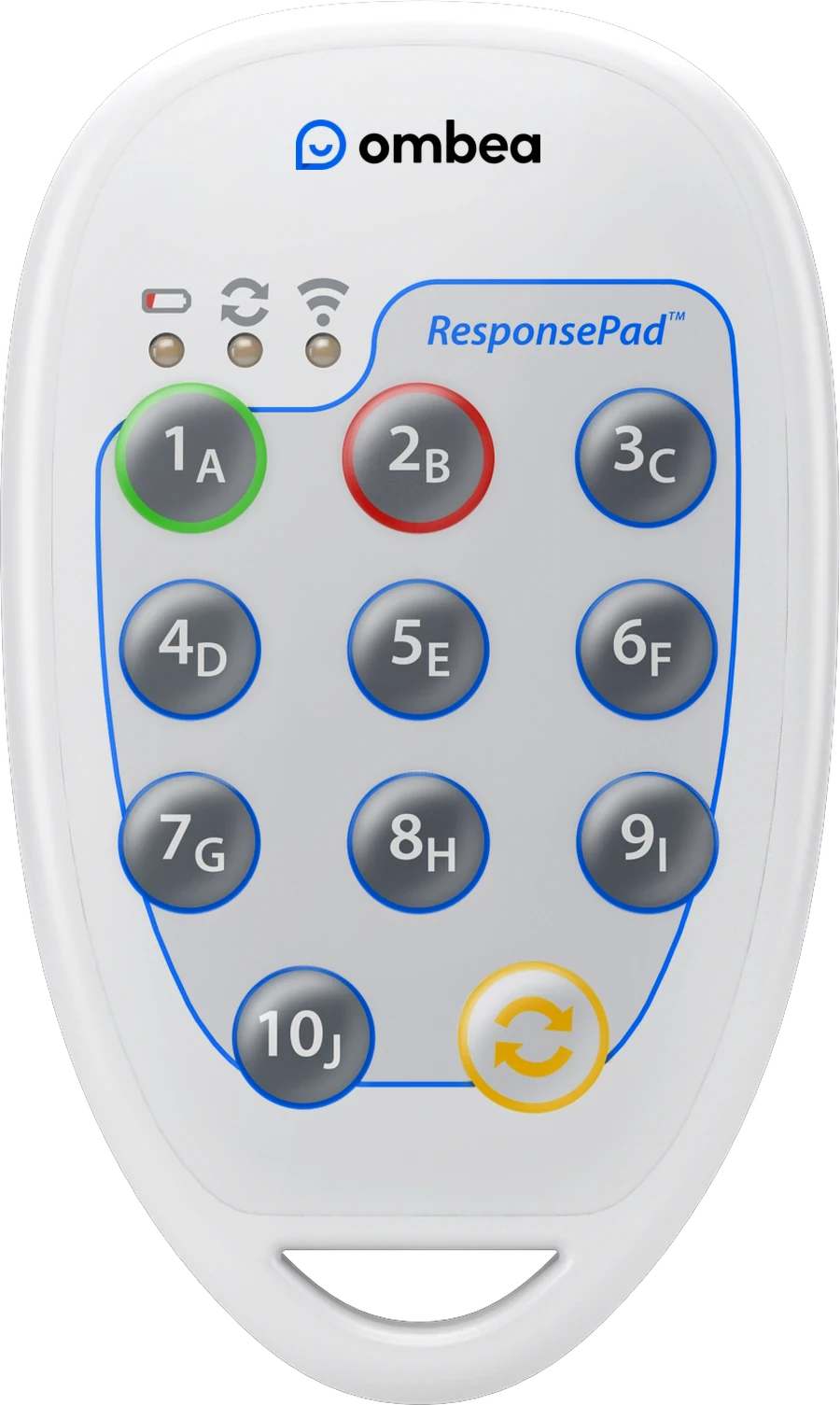
Hand out the ResponsePads and present as usual. People press a key. That is it.
- No setup
- No pairing or syncing
- No Wi-Fi, no app
- Batteries last three years
The results appear instantly.
The chart fills up the moment people answer. Talk through the result while the room is still with you.
And when you want more, it is there.
Group results, team quizzes, comparisons and reports. Out of the way until you need them.
Grouping
See how each group answered. Ask a background question, like gender, department or year, and split any result by it in one stacked chart.
Learn more →Competition
Turn any quiz into a game. Mark the correct answer, split the room into teams and show the team scores between rounds.
Learn more →Comparison
Weigh suggestions on two criteria at once, like value and risk. Bubble size shows how relevant the room finds each one.
Learn more →Word clouds
Ask an open question and watch the answers form a word cloud. People type their answer in ResponseApp on their own phone.
Learn more →Any presentation tool
Not using PowerPoint? OMBEA Response 360 runs next to Keynote, a web page or a video, and collects answers the same way.
Learn more →
Reports
Every answer is saved. After the session, open question reports and participant reports, ready to print or share.
Learn more →
Made for your room
Higher education
Universities and colleges
Learn more →EducationSchools
Every student answers, phones away
Learn more →EducationMedical education
Every learner commits to a decision
Learn more →OrganizationsCorporate training
L&D, onboarding and compliance
Learn more →OrganizationsTraining providers
Courses that run anywhere
Learn more →OrganizationsPublic sector
Training and votes, no phones
Learn more →Meetings and eventsMeetings and voting
Anonymous votes, counted in seconds
Learn more →Meetings and eventsEvents and conferences
Give every delegate a voice
Learn more →Trusted in lecture halls, boardrooms and conference halls


It was great. It's such a useful conference tool because when you're talking you know for sure whether or not you're hitting the right notes and you can adjust accordingly.

The OMBEA system is a fantastic tool in our inventory. Enabling exciting interaction, instant feedback to the presenter, and rich data from the class, OMBEA immediately enhances the learning experience for participants on both sides of the lecturn. Swift to deploy, simple yet powerful; I will be using OMBEA for all of my training presentations in future!

So far we've used the charts and graphs in presentation meetings to build the story around team engagement and particular areas of interest. … the OMBEA data has made it much simpler to get buy-in from around the business.


OMBEA couldn't have been easier to set up. Everything was so simple to use. The students really enjoyed using it and it's often quoted in their feedback to us as being an enjoyable part of the day!


The delegates like the interactivity and the speed with which their marks come back to them. The admin time saved alone makes OMBEA an amazing investment as all the data is in Excel and can be merged and reviewed instantly!

The students responded very positively to the OMBEA system. Mixing the clickers and apps made it very flexible and they found it easy to use. From a lecturer's point of view, it made lectures more interesting and it is much easier to use than our existing response technology.

OMBEA is proving a great asset to the delivery of our staff development activities. We have been able to use it for staff focus groups, induction events and team away days. It is very easy to use and set up and so far people have been interested and excited to use it. It increases interactivity in a session and the instant results mean that the sessions are very open. Using OMBEA encourages discussion and engagement. The feedback has been great!
OMBEA cut straight through those language barriers and had the room on the edge of their seats!

The voting couldn't have gone any better, it was exactly what we were looking for.

We chose OMBEA because they were excellent across a combination of important factors. They had user-friendly software, good quality hardware, and a refreshing approach to post-sales support. Their attention to support has been brilliant.
OMBEA makes everything so much more interactive and the delegates keep telling us how much they enjoy it. The support we get from the team is great and we love having them at our conferences!

Ombea is easy to manage and grows alongside your business.

OMBEA has been a great maths resource but also a useful cross-curricular too with a maths link in mind. It's also great for feedback in line with the 1/2/3 system we have in place to encourage self assessment and to identify and address any particular misconceptions. It's fantastic for data handling and compiling data to use with the class. Overall it's a great piece of kit and I love that we can tailor it so easily!
In some of my courses I might have up to 350 students. It can be tough to get them all to join in, but participation is vital for learning. OMBEA's clickers provide a great solution for this. Using OMBEA's systems, students effectively learn from one another, and their learning has benefited enormously as a result.


OMBEA Response gives me real-time feedback on how my audience is listening to and learning from my presentation. An astoundingly simple and powerful tool!


OMBEA's instant class results save time and give the students the opportunity to pursue their own development and performance.
I now test the class on a continuous basis, rather than having two exams for each learning module. And there's no extra marking to do, either.

We get access to valuable information that we can use. OMBEA is also greatly appreciated by the participants who think it's a fun and rewarding element of the day.
Questions, answered
How does OMBEA work with PowerPoint?
OMBEA Response adds a new tab to PowerPoint. Click New question to add a slide with a question, answer options and a native PowerPoint chart. Run your slideshow, people answer, and the chart fills with the results.
Do clickers need setup or pairing?
No. Plug in the receiver and the clickers just work. No configuration, no pairing and no syncing.
How long do the batteries last?
About three years in normal use.
Will the question slides match my design?
Yes. Question slides are normal PowerPoint slides. They follow your theme, colors and fonts, and the results chart is a native PowerPoint chart.
Does it work on Mac?
Yes, with OMBEA Response 360. It runs on Windows and Mac and works with any presentation tool, such as Keynote.
Ready when you are
Tell us how many people you present to. We suggest a kit and send a quote.